
Mint Gaming
ECL EntertainmentLifestyle
4.052.00 Reviews
- Version
- 2.2.33
- Installs
- 10.00K
- Age Rating
- Mature 17+
Screenshots
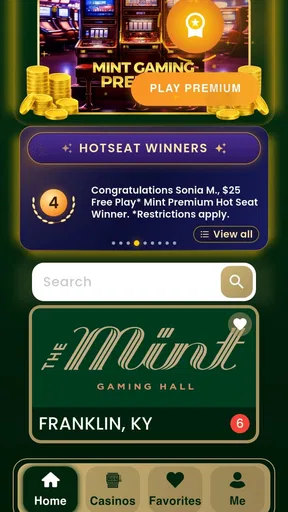
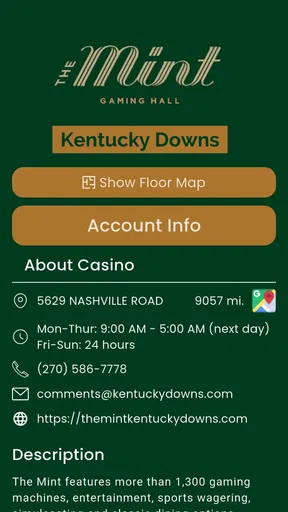
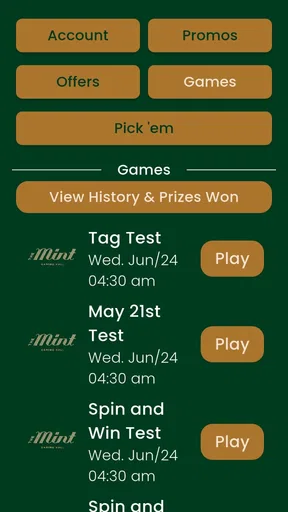


Our Review of Mint Gaming
 Analysis by Appyee
Mint Gaming is the kind of lifestyle app I would open when a gaming trip is starting to feel like a pile of separate browser tabs. Instead of treating the casino visit, hotel search, restaurant planning, and special offers as unrelated tasks, it brings those parts into one mobile experience. That focus makes it more useful for planning a destination-based gaming getaway than for someone who only wants a simple game or a general travel planner.
I tested it with a practical question in mind: could I use it to move from “we should go somewhere” to a reasonably organized plan without constantly jumping between unrelated services? My answer is cautiously positive. The app is free to download, the presentation is easy to understand, and its subject matter is very specific. At the same time, that narrow focus is also its biggest limitation. If your plans do not involve the venues and offers presented inside the app, its value drops quickly.
How I judged Mint Gaming as a planning tool
I looked at it less like a traditional gaming app and more like a digital companion for choosing and preparing a leisure trip. The important question is not whether it replaces every travel service. It does not need to. The better question is whether it helps me make decisions that are awkward when scattered across search results: where to play, where to stay, where to eat, and which available offer might influence the timing or shape of the visit.
That distinction matters because people use the word “gaming” in different ways. If you expect casino-style play directly on your phone, this is not the experience I would choose. Its store summary points toward games, hotels, dining, offers, and trip planning, so I approached it as an information and discovery tool connected to a real-world getaway. That makes the app more relevant before a trip than during a long commute when I simply want entertainment.
The app comes from ECL Entertainment and sits in the Lifestyle category. Its mature audience positioning is important: the content rating is Mature 17+, so I would not treat it as a family travel planner. Anyone downloading it should understand that its subject matter is intended for adults and that responsible spending should remain part of the planning process, especially when gaming is one element of the trip.
On the practical side, Mint Gaming is free to install, although it includes optional purchases ranging from $1.99 to $99.99 per item. I would not assume that downloading it makes the entire getaway inexpensive. A free planning tool can still lead to decisions involving accommodation, meals, transportation, and gaming budgets. I found it most useful when I treated offers as information to evaluate rather than as a reason to spend immediately.
The current release is version 2.2.33 and it supports Android from version 7.0 onward. That broad compatibility is helpful for people who keep an older phone as a travel device, but I would still make sure the app runs comfortably on the handset you plan to carry. Travel planning is frustrating when a device is low on storage, slow to load, or difficult to use outdoors, regardless of how good the idea behind the app may be.
The first useful workflow: decide the trip before chasing offers
My strongest advice is to begin with the shape of the trip rather than with the most attractive-looking promotion. First decide whether the visit is mainly about gaming, a hotel break, dining, or a combination. Then use Mint Gaming to look for the venues and supporting options that fit that purpose. This simple order prevents an offer from dictating a trip that does not actually suit you.
For example, imagine planning a weekend with a friend. One person cares about the gaming venue, while the other is more interested in a comfortable stay and a good meal. I would use the app to compare the available hotel and dining possibilities around the gaming plan, then discuss the overall budget before making commitments elsewhere. That is a more realistic use than opening the app alone and expecting it to make every travel decision automatically.
A less obvious benefit is that the app encourages you to think in connected choices. A dining option can affect the evening schedule. A hotel can affect how much time you spend traveling between activities. An offer may be useful only if its conditions match the dates and habits of your group. I would make a short checklist outside the app—preferred dates, accommodation needs, meal preferences, and a firm spending limit—so the information stays tied to a real plan.
Where the focused approach works best
Mint Gaming wins when convenience comes from subject-matter focus. General search engines can find hotels, restaurants, and entertainment, but they often make the user assemble the connection between those choices. A broad travel app may be excellent for flights and accommodation while offering little context about a gaming destination. This app starts from the gaming getaway itself, which can reduce the mental work involved in joining the pieces together.
I also like that it gives the trip a single starting point. Someone who already knows the destination can use it as a quick way to inspect the surrounding experience instead of searching separately for every category. That is especially useful when planning with another person, because it gives both of you a shared place to discuss the possible venue, stay, meal, and offer rather than passing screenshots back and forth from different services.
The app’s average rating is 4.0 from around one hundred forty ratings, with more than fifty written reviews. I read that as a reasonably encouraging but not definitive signal. It suggests that the concept works for a portion of its audience, while the modest review volume means I would still judge it by my own destination and planning needs rather than treating the rating as proof that it will suit every traveler.
Its reach is also still fairly focused, with over ten thousand installs. That is not a reason to dismiss it, but it does affect how I interpret the product. I see it as a specialized companion rather than a universally established travel platform. The smaller audience makes it even more important to check whether the app’s actual venue coverage and offers are relevant to where you want to go.
Three practical habits that make the app more useful
First, I would separate discovery from booking. Use Mint Gaming to explore the available gaming, hotel, dining, and offer choices, but confirm the final details before paying through whatever official process is presented. This habit protects you from building a schedule around an assumption that an offer applies to your dates or that a room and dining option match your needs.
Second, I would save or note the order of activities rather than merely collecting attractive options. A gaming getaway can become tiring when every decision is made on the spot. I would choose the main activity first, place dining around it, and then consider whether the hotel location makes the plan comfortable. This turns the app from a catalogue into a lightweight itinerary aid, even if the final schedule is kept in my calendar or notes.
Third, I would calculate the complete cost outside the excitement of the offer screen. The optional in-app purchase range tells me that some items may involve real spending inside the app, while the trip itself has separate costs. I would compare the value of an offer with the full price of the stay, meals, transport, and planned gaming budget. A discount is only useful when it improves the whole trip rather than encouraging an unnecessary purchase.
Those habits reveal a trade-off. Mint Gaming can make a focused plan feel simpler, but it cannot replace personal judgment. It may help me discover the components of a getaway, yet I still need to check timing, suitability, affordability, and the needs of everyone traveling with me. That is not a flaw unique to this app; it is the normal boundary between a planning assistant and a booking or budgeting decision.
When a different category of app fits better
I would choose a general travel app first if my main problem were flights, broad hotel comparison, maps, or a multi-city itinerary. Those services are designed around transportation and conventional travel logistics, while Mint Gaming is built around a narrower leisure theme. Using it as the only tool for a complicated journey would create extra work rather than remove it.
I would also choose a restaurant-focused service if dining were the central reason for the trip. A dedicated food platform is usually the more natural place to compare menus, dietary suitability, opening times, and local alternatives. Mint Gaming makes more sense when dining is one part of a larger gaming destination plan, not when the restaurant itself is the entire destination.
Likewise, people who want direct mobile gaming should look elsewhere. The app’s appeal is in organizing or exploring a getaway, not in replacing a dedicated game. That difference is easy to miss because of the word “Gaming” in its name. I would explain it to a friend this way: it helps you plan around gaming, rather than turning the phone into the gaming venue.
There is also a good case for using several familiar services instead. Separate hotel, dining, map, calendar, and budgeting tools may feel less elegant, but they can offer broader coverage and more established workflows. The cost is time and attention. Mint Gaming’s advantage is reducing that fragmentation for the specific kind of trip it targets; the alternative wins when flexibility and breadth matter more than thematic focus.
What switching to it really involves
The financial barrier is low because the app itself is free, but the time cost is not automatically zero. I would need to learn where the relevant information is organized, understand how offers fit into my plans, and decide which details should be verified elsewhere. For a one-off trip with no connection to the app’s featured destinations, that learning effort may not be worthwhile.
The switch makes more sense for someone who regularly plans gaming getaways or prefers having a dedicated starting point. In that situation, the app can become part of a repeatable routine: open it during the idea stage, compare the available trip components, write down the shortlist, and then complete the final checks before committing. The routine is more valuable than any single browsing session.
I would also think about who else is involved. If I were traveling alone, I could make quick decisions inside my own budget. With a group, I would share the important details rather than assuming everyone sees the same value in an offer or venue. A friend who dislikes gaming may care almost entirely about the hotel, dining, or surrounding leisure choices, so the app works best when the group agrees on the trip’s purpose first.
The Mature 17+ rating reinforces that this is not something I would hand to a younger traveler as a general entertainment app. For adults, the rating is a clear reminder to approach the gaming element responsibly. I would set a spending limit before browsing, avoid treating promotional language as a reason to increase that limit, and keep the trip enjoyable even if the gaming portion does not go as hoped.
My recommendation for different kinds of users
I recommend Mint Gaming to adults who are actively considering a gaming-focused getaway and want one specialized place to begin exploring venues, hotels, dining, and offers. It is particularly suitable when the trip is still in the planning stage and the challenge is connecting those choices. The free entry point makes it easy to test without committing to a subscription-style tool, while the focused design gives it a clearer purpose than a generic lifestyle app.
I would recommend it less strongly to someone who already has a complete travel routine and only needs a hotel, a restaurant, or a map. In those cases, the usual category-specific services may be faster and more comprehensive. I would also skip it if I expected a standalone mobile game, a full booking platform, or a universal trip organizer. Choosing the app for the wrong job would make its narrow focus feel like a weakness.
After using it as a decision aid, my view is that Mint Gaming succeeds when it stays in its lane. It does not need to become every kind of travel app to be useful. Its best role is the first planning window for an adult gaming getaway: a place to shape the idea, inspect the connected options, and decide whether the trip is worth pursuing before handling the final details through the appropriate channels.
My bottom line: I would keep Mint Gaming on my phone if I were planning this type of trip, especially when hotel, dining, offers, and gaming need to be considered together. I would not rely on it as my only travel or budgeting tool, and I would not let an offer replace a sensible plan. Used with those limits, it offers a focused and practical starting point rather than pretending to be something broader.
Verdict
Strengths of Mint Gaming
- Clean interface makes game discovery quick and straightforward.
- Supports casual gaming sessions without requiring a powerful device.
- Game categories help users find titles matching their interests.
- Regular content updates can keep the selection feeling fresh.
- Simple navigation is suitable for users with limited gaming experience.
Limitations of Mint Gaming
- Game availability may vary by region or device compatibility.
- Some titles may require additional downloads after installation.
- The app may consume noticeable data when browsing or downloading games.
- Performance can differ depending on device age and available storage.
- Privacy and account permissions should be reviewed before signing up.
Similar Picks in This Category
View All
SmartThings
Samsung Electronics Co., Ltd.4.6

Google Home
Google LLC4.0

Pinterest4.2

Astrotalk - Talk to Astrologer
Astrology & Horoscope4.7

My Verizon
Verizon Consumer Group4.5

Samsung Wallet (Samsung Pay)
Samsung Electronics Co., Ltd.4.1
Frequently Asked Questions
What is Mint Gaming, and what can I do with the app?
Mint Gaming is a mobile gaming platform designed to give users access to games, gaming-related content, and interactive features in one place. Depending on your region and the current version, the app may include different game categories, rewards, events, or community functions. Before downloading, check the official store description to confirm which features are available on your device and in your country.
Is Mint Gaming free to download and use?
Mint Gaming may be free to download, but some games, features, virtual items, subscriptions, or promotional offers can involve optional in-app purchases. The exact pricing and payment options may vary between Android and iOS. We recommend reviewing the app-store listing and purchase terms before starting, especially if children use the device, and enabling password or biometric approval for every transaction.
Does Mint Gaming require an account or an internet connection?
Some Mint Gaming features may work only after creating an account or signing in through a supported service. An internet connection is generally required for downloading content, synchronizing progress, accessing online events, receiving updates, or using multiplayer and reward systems. Certain games might offer limited offline access, but availability can change, so users should not assume that every feature works without mobile data or Wi-Fi.
Is Mint Gaming safe for children and does it protect user privacy?
Parents should review Mint Gaming’s age rating, privacy policy, permissions, and communication features before allowing children to use it. Gaming platforms can collect information such as account details, device data, usage activity, or purchase history, depending on the features enabled. Use parental controls, restrict in-app purchases, and avoid sharing personal information in chats or public profiles unless you understand how the platform handles it.
What should I check if Mint Gaming does not install or run correctly?
If Mint Gaming fails to install, first confirm that your phone meets the listed operating-system and storage requirements. A stable internet connection, sufficient free space, and an updated app store can also help. If the app crashes, restart the device, install available system updates, and clear temporary data where appropriate. For account, payment, or server problems, contact the developer through the official support channel rather than downloading unofficial versions.
